Best Integrations & Automation Resources for Vibe Coders
Updated 24/10/2026
This guide is for vibe coders who want their AI agent to do real work in other apps. That means opening issues, sending messages, filling sheets, or running a workflow. You do not need to be an expert, but you will need to sign in to some accounts.
The resources below connect your agent to GitHub, Google Workspace, Zapier, n8n and thousands of other services. We list the safer and easier options first. Some need API keys, an account, or self-hosting, and we say so for each one.
- MCP serverSafe
github-mcp-server
github
Connects AI tools directly to GitHub, enabling agents to manage repositories, issues, PRs, and analyze code using natural language.
34kMIT#1 · Why we picked it
Top quality score (98), labeled safe and beginner level; lets your agent manage repos, issues and pull requests, but expect to set up GitHub access first. - MCP serverCaution
activepieces
activepieces
Activepieces is an open-source, no-code automation platform with a large MCP toolkit for AI agents, allowing users to build workflows and integrate with various services.
25k#2 · Why we picked it
A no-code visual builder at beginner level with a large MCP toolkit; it is labeled caution, so check which apps you connect and what access you grant. - SkillSafe
cli
googleworkspace
A command-line interface for Google Workspace APIs that includes over 40 AI agent skills for managing Drive, Gmail, Calendar, and more.
31kApache-2.0#3 · Why we picked it
Labeled safe with 40+ agent skills for Drive, Gmail, Calendar, Docs and Sheets; it needs Google sign-in and some command-line setup. - MCP serverSafe
n8n-mcp
czlonkowski
n8n-MCP is an MCP server providing AI assistants with comprehensive access to n8n's node documentation and operations to build workflows.
23kMIT#4 · Why we picked it
Labeled safe and gives your agent n8n node documentation so it can build workflows for you; it works best if you already use n8n. - PluginCaution
n8n
n8n-io
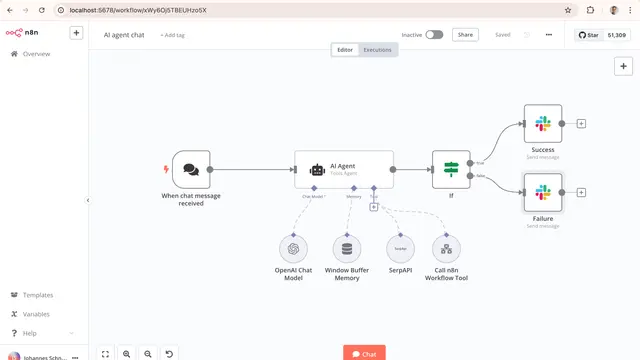
A fair-code workflow automation platform with native AI capabilities, enabling the visual building and deployment of AI agents and complex workflows with 1500+ integrations.
209k#5 · Why we picked it
A very popular workflow platform (208k stars) with 1500+ integrations and AI features; labeled caution and intermediate, and self-hosting takes effort. - MCP serverCaution
composio
ComposioHQ
Provides 1000+ pre-authenticated tools and integrations for AI agents to perform actions across various web services.
30kMIT#6 · Why we picked it
Offers 1000+ pre-authenticated tools, including Gmail and Slack, and per-user auth handling; labeled caution, so limit what your agent can touch. - MCP serverSafe
mcpo
open-webui
A simple MCP-to-OpenAPI proxy server that instantly exposes any MCP tool as an OpenAPI-compatible HTTP server, enabling broader integration with LLM agents.
4.4kMIT#7 · Why we picked it
Labeled safe; turns any MCP tool into an OpenAPI server with built-in API keys, useful when your agent tool does not speak MCP.
How to choose
- Start with the safe label and beginner level, such as the GitHub MCP server or Zapier MCP, before trying caution items.
- Pick the app you use most. If your work lives in GitHub, use the GitHub server. If it lives in Gmail or Drive, use the Google Workspace CLI.
- Want one tool for many apps? Zapier MCP, Activepieces and Composio cover thousands of services, but each needs an account and permissions.
- For caution items, give the agent only the access it needs, and test with a throwaway account or a small task first.
FAQ
Do I need to know how to code to use these?
Not much. Zapier MCP and Activepieces are beginner level and use plain English or a visual builder. n8n and the Google Workspace CLI take more setup.
What does the caution label mean?
It means the resource needs a closer look before you use it. These tools can act inside your accounts, so read what access they ask for and start with limited permissions.
Will I need API keys or accounts?
Usually yes. Tools that connect to GitHub, Google or Zapier need you to sign in or create a key. Keep keys out of shared code and chat logs.
Should I use n8n or Zapier?
Zapier MCP is easier to start with and is labeled safe. n8n gives you more control and can be self-hosted, but it is intermediate level and labeled caution.