playwright-mcp
microsoft · microsoft/playwright-mcp
An MCP server that lets your agent control a browser through Playwright using structured accessibility snapshots instead of screenshots.
Playwright MCP server
See it in action
Run on Airsc
Task: “Audit ten public Airsc pages at 390 px with the Playwright MCP server (tap targets, text fields that make iOS zoom, overflow, console errors), fix what it found, and run it again. Next to it, design-dna's colour maths measured every painted colour on nine pages against the BRAND.md tokens; the off-brand panel colours moved onto tokens.”
Claude Code · 2026-10-25
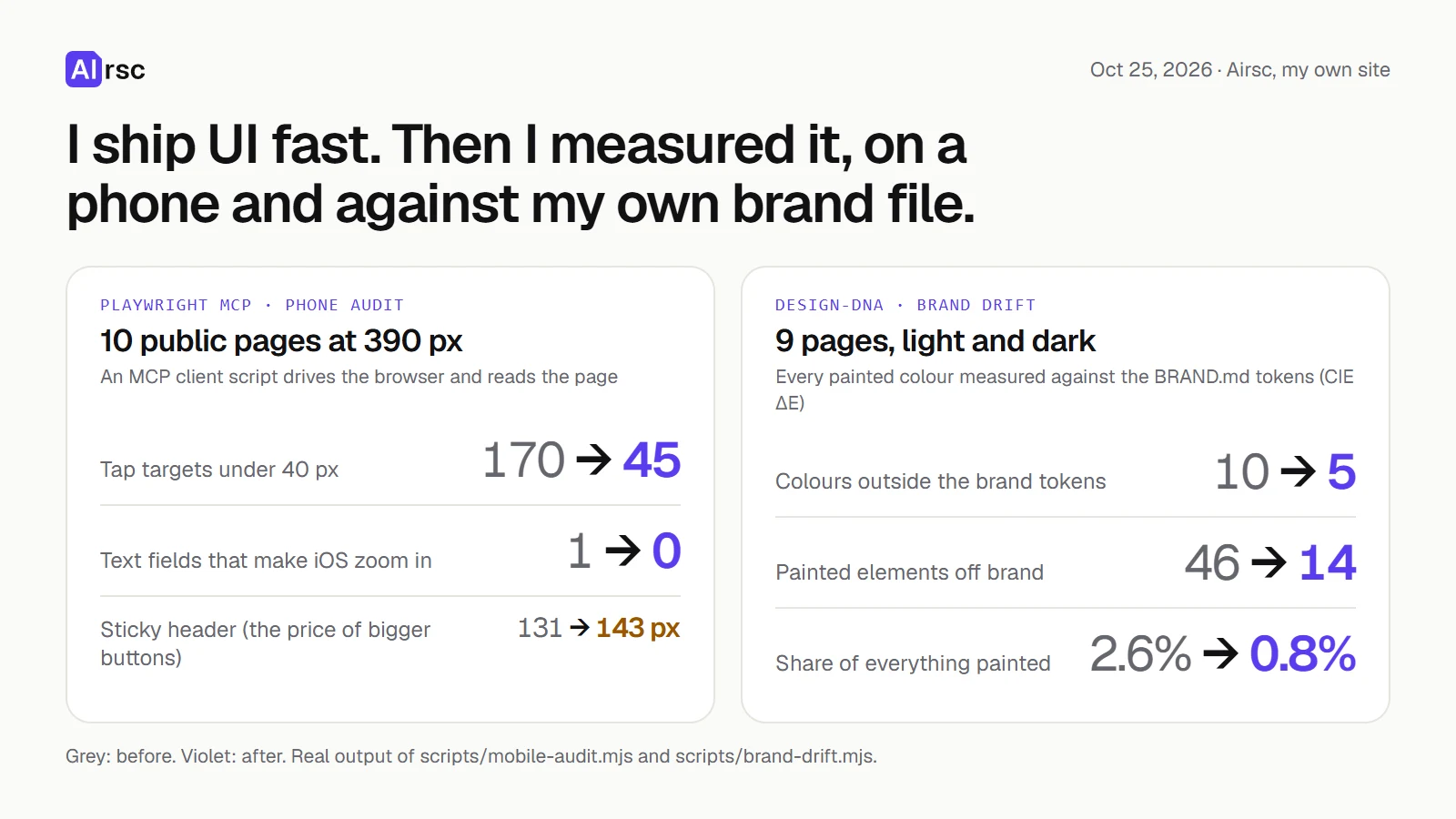
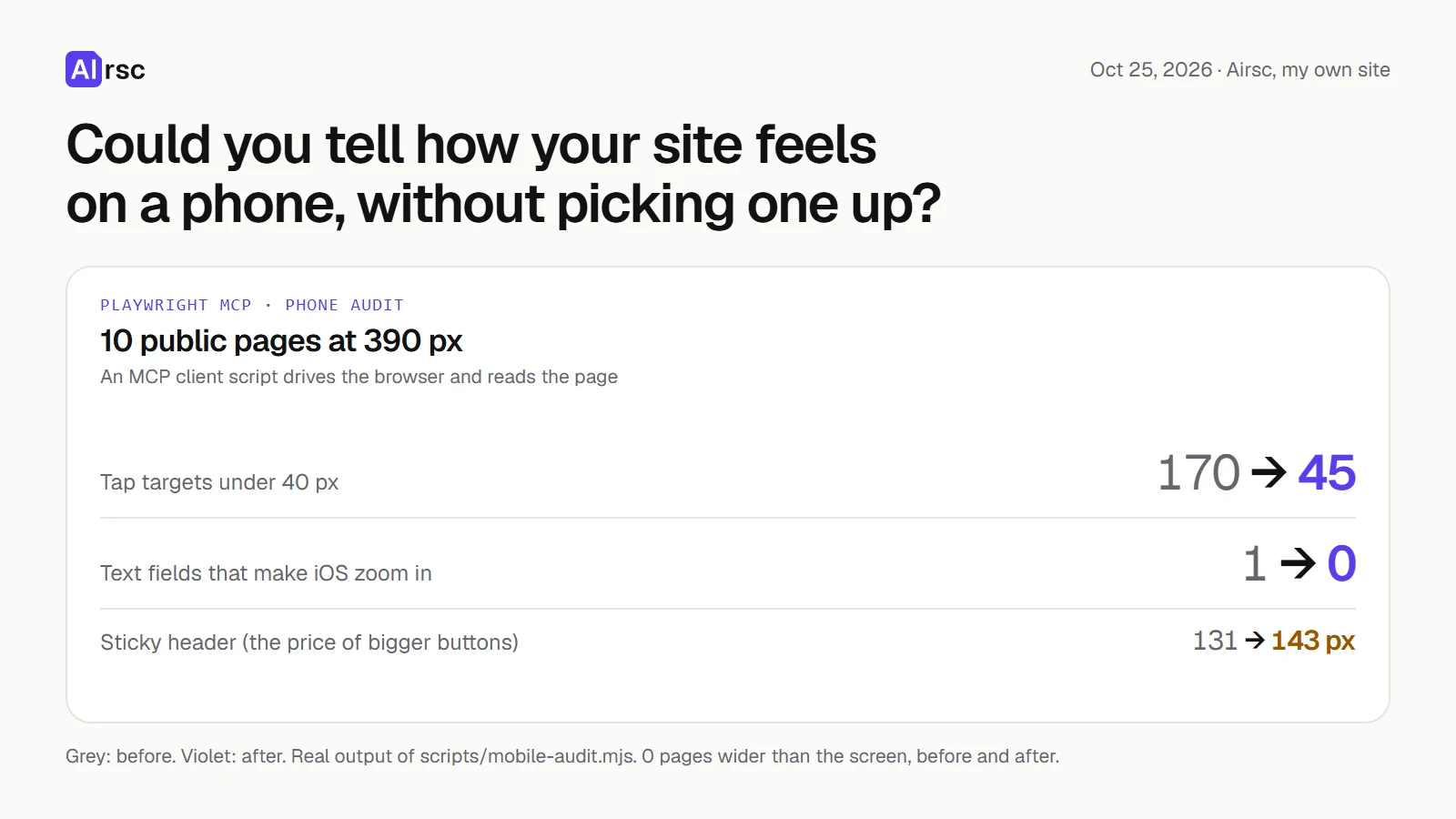
Run on AirscBefore and after: tap targets under 40 px 170 → 45, text fields that make iOS zoom 1 → 0, colours outside the brand tokens 10 → 5; the sticky header grew from 131 to 143 px
What you can do with it
- Have the agent open your app and click through it to check it works
- Automate filling forms and extracting data from websites
- Run exploratory or self-healing browser tests
Safety check
No risky patterns found in the files we scanned.
Automated scan of the repo files. Always review code you run.
From the README
Playwright MCP
A Model Context Protocol (MCP) server that provides browser automation capabilities using Playwright. This server enables LLMs to interact with web pages through structured accessibility snapshots, bypassing the need for screenshots or visually-tuned models.
Playwright MCP vs Playwright CLI
This package provides MCP interface into Playwright. If you are using a coding agent, you might benefit from using the CLI+SKILLS instead.
-
CLI: Modern coding agents increasingly favor CLI–based workflows exposed as SKILLs over MCP because CLI invocations are more token-efficient: they avoid loading large tool schemas and verbose accessibility trees into the model context, allowing agents to act through concise, purpose-built commands. This makes CLI + SKILLs better suited for high-throughput coding agents that must balance browser automation with large codebases, tests, and reasoning within limited context windows.Learn more about Playwright CLI with SKILLS.
-
MCP: MCP remains relevant for specialized agentic loops that benefit from persistent state, rich introspection, and iterative reasoning over page structure, such as exploratory automation, self-healing tests, or long-running autonomous workflows where maintaining continuous browser context outweighs token cost concerns.
Key Features
- Fast and lightweight. Uses Playwright's accessibility tree, not pixel-based input.
- LLM-friendly. No vision models needed, operates purely on structured data.
- Deterministic tool application. Avoids ambiguity common with screenshot-based approaches.
Requirements
- Node.js 18 or newer
- VS Code, Cursor, Windsurf, Claude Desktop, Goose, Grok, Junie or any other MCP client
Getting started
First, install the Playwright MCP server with your client.
Standard config works in most of the tools:
{
  "mcpServers": {
    "playwright": {
      "command": "npx",
      "args": [
        "@playwright/mcp@latest"
      ]
    }
  }
}
Amp
Add via the Amp VS Code extension settings screen or by updating your settings.json file:
"amp.mcpServers": {
  "playwright": {
    "command": "npx",
    "args": [
      "@playwright/mcp@latest"
    ]
  }
}
Amp CLI Setup:
Add via the amp mcp add command below
amp mcp add playwright -- npx @playwright/mcp@latest
Antigravity
Add via the Antigravity settings or by updating your configuration file:
{
  "mcpServers": {
    "playwright": {
      "command": "npx",
      "args": [
        "@playwright/mcp@latest"
      ]
    }
  }
}
Claude Code
Use the Claude Code CLI to add the Playwright MCP server:
claude mcp add playwright npx @playwright/mcp@latest
Claude Desktop
Follow the MCP install guide, use the standard config above.
Cline
Follow the instruction in the section Configuring MCP Servers
Example: Local Setup
Add the following to your cline_mcp_settings.json file:
{
  "mcpServers": {
    "playwright": {
      "type": "stdio",
      "command": "npx",
      "timeout": 30,
      "args": [
        "-y",
        "@playwright/mcp@latest"
      ],
      "disabled": false
    }
  }
}
Codex
Use the Codex CLI to add the Playwright MCP server:
codex mcp add playwright npx "@playwright/mcp@latest"
Alternatively, create or edit the configuration file ~/.codex/config.toml and add:
[mcp_servers.playwright]
command = "npx"
args = ["@playwright/mcp@latest"]
For more information, see the Codex MCP documentation.
Copilot
Use the Copilot CLI to interactively add the Playwright MCP server:
/mcp add
Alternatively, create or edit the configuration file ~/.copilot/mcp-config.json and add:
{
  "mcpServers": {
    "playwright": {
      "type": "local",
      "command": "npx",
      "tools": [
        "*"
      ],
      "args": [
        "@playwright/mcp@latest"
      ]
    }
  }
}
For more information, see the Copilot CLI documentation.
Cursor
Click the button to install:
Or install manually:
Go to Cursor Settings -> MCP -> Add new MCP Server. Name to your liking, use command type with the command npx @playwright/mcp@latest. You can also verify config or add command like arguments via clicking Edit.
Factory
Use the Factory CLI to add the Playwright MCP server:
droid mcp add playwright "npx @playwright/mcp@latest"
Alternatively, type /mcp within Factory droid to open an interactive UI for managing MCP servers.
For more information, see the Factory MCP documentation.
Gemini CLI
Follow the MCP install guide, use the standard config above.
Goose
Click the button to install:
Or install manually:
Go to `Advanced se