Best Browser Automation & Web Data Resources for Vibe Coders
Updated 24/10/2026
This guide is for vibe coders who want their AI agent to open web pages, click through an app, search the web or pull data from a site. You do not need to write scrapers by hand. You only need to pick the right tool and connect it.
These resources unlock three jobs: testing your own app in a real browser, searching and reading the live web, and collecting structured data at scale. Some are free and local. Others use a hosted service and may need an account or API key, so check the setup notes first.
- SkillSafe
playwright-mcp
microsoft
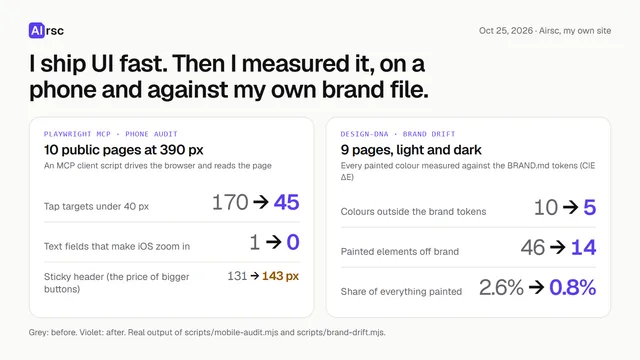
An MCP server that lets your agent control a browser through Playwright using structured accessibility snapshots instead of screenshots.
38kApache-2.0#1 · Why we picked it
Safe, beginner level, and the most starred of the Playwright options (37,884 stars); good for clicking through your app, filling forms and extracting data. - MCP serverSafe
firecrawl-mcp-server
firecrawl
An official MCP server that enables AI agents to search, scrape, and interact with the live web for clean, structured data.
7.7kMIT#2 · Why we picked it
Official, safe, quality 95; turns a URL into clean structured data and can crawl many pages, but it is intermediate and likely needs a Firecrawl account. - MCP serverSafe
apify-mcp-server
apify
This MCP server allows AI agents to extract data from various websites using Apify's thousands of ready-made scrapers, crawlers, and automation tools.
13kMIT#3 · Why we picked it
Safe, quality 95; gives access to thousands of ready-made scrapers for e-commerce, social media and search results, though you will need an Apify setup. - SkillSafe
skills
browser-act
This skill enables AI agents to perform real-browser automation and web data extraction, bypassing anti-bot measures.
6.1kMIT#4 · Why we picked it
Safe, quality 95; runs a real browser to handle sites with anti-bot checks and can hand a stuck step back to you. - PluginSafe
chrome-devtools-mcp
ChromeDevTools
This MCP server allows your coding agent to control and inspect a live Chrome browser for automation, debugging, and performance analysis.
54kApache-2.0#5 · Why we picked it
Safe and very popular (54,045 stars); lets the agent inspect a live Chrome for network requests, console errors and performance, best for debugging. - PluginSafe
ego-lite
citrolabs
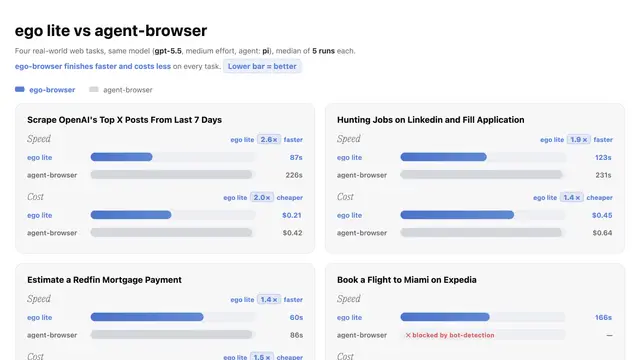
This browser lets AI agents run web automation tasks in isolated workspaces, sharing your logged-in state without disturbing your browsing.
19kMIT#6 · Why we picked it
Safe and beginner level; runs agent tasks in isolated workspaces and can reuse your logged-in sessions without taking over your own browsing. - MCP serverCaution
wigolo
KnockOutEZ
Wigolo is a local-first web intelligence MCP server that empowers AI agents with capabilities for searching, fetching, crawling, and researching the web without API keys or cloud services.
5.4k#7 · Why we picked it
Beginner level and works locally without API keys, but it has a caution safety label, so review what it does before installing.
How to choose
- Testing your own app? Start with playwright-mcp or chrome-devtools-mcp. Both are safe and work on a real browser.
- Need to search or read the web? Pick Exa for search and research, or Firecrawl to turn pages into clean data.
- Scraping at scale or from protected sites? Look at Apify or browser-act-skills, and expect more setup.
- Prefer the 'safe' label. Resources marked 'caution' need a closer read of their code and permissions first.
- Check the site's terms before scraping, and be careful when giving an agent access to your logged-in accounts.
FAQ
What is the easiest tool to start with?
playwright-mcp is a good first choice. It is safe, beginner level, and covers clicking, form filling and data extraction. For web search only, try exa-mcp-server.
Do I need API keys?
It depends. Hosted services like Exa, Firecrawl and Apify usually need an account or key. Wigolo says it works without API keys, and Playwright-based tools run in a local browser. Check each setup page.
Can these tools get past anti-bot checks?
Some claim to, such as browser-act-skills and brightdata-mcp. Results vary by site. Always follow the site's rules and local law.
Is it safe to let an agent use my logged-in browser?
It carries risk, because the agent can act as you. Use isolated workspaces like ego-lite, avoid sensitive accounts, and watch what the agent does.